 Core team
CEO Briefing
Maya
Turns your pipeline, activity, and exceptions into one clear operating brief, so you know what needs a decision without digging through another dashboard.
Current taskAssembling Monday’s three-decision brief
Hire MayaManaged AI operations for relationship-driven teams
Your inbox, CRM, and calendar hold the work. None of them owns it. We install a five-person AI operating core, then add specialists from a 14-role bench as your scope grows—with you in control of every sensitive action.
30 minutes · zero prep · leave with your first workflow map · or drive it yourself first
Browse the 230+ workflows your agent ships with →
See what the pod does for your vertical:
Compare all six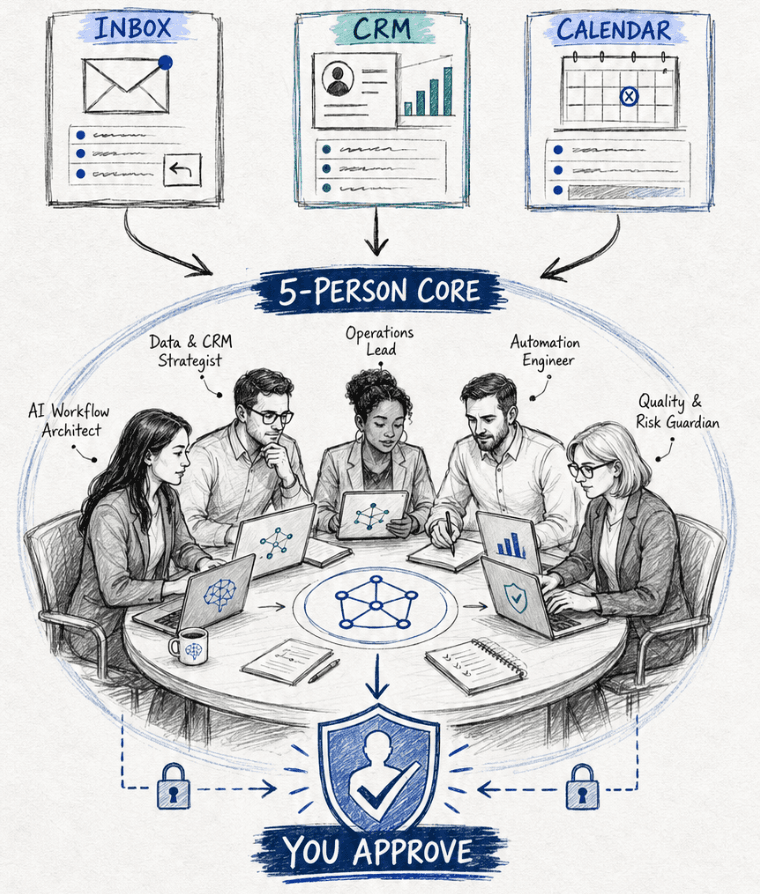
The missing operating layer
Software gives you features. We connect the work between those features, keep the next action moving, and bring you the decisions that still need a human.
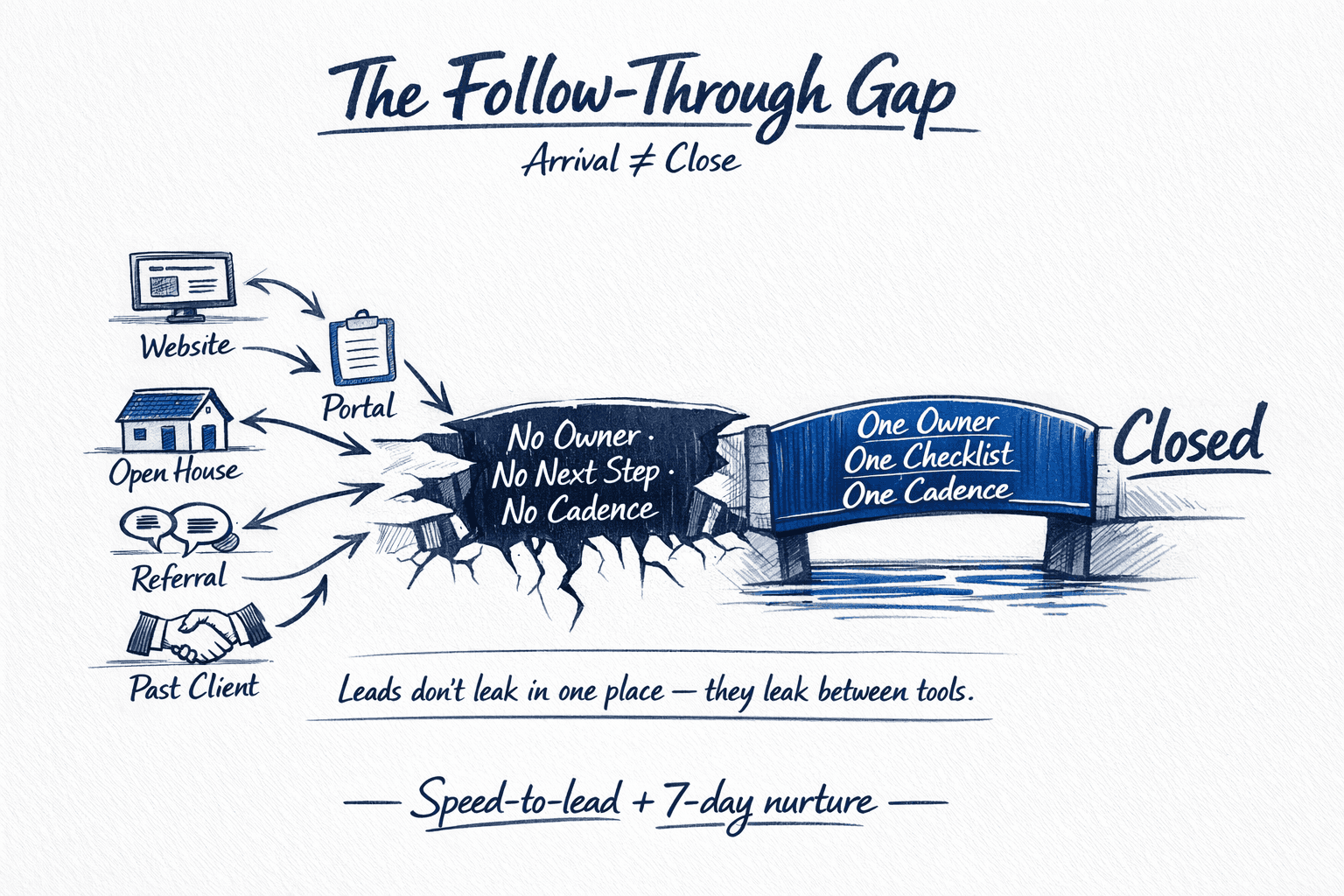
From chaos to owned
The work lives everywhere — inbox, phone, notes, calendar — until someone owns the follow-through. One message to your Chief of Staff fans work across five specialists and every client-facing action waits at the approval gate.

The people-shaped interface
Start with five clear owners for recurring work, then add leadership and hands-on specialists as the scope grows. All 14 roles report through one operating cadence, with you in control of sensitive actions.
Illustrative AI role portraits
01 · Your operating core
The core team owns the daily rhythm across pipeline, delivery, client care, and the decisions that need your attention.
Core teamCEO Briefing
Turns your pipeline, activity, and exceptions into one clear operating brief, so you know what needs a decision without digging through another dashboard.
Current taskAssembling Monday’s three-decision brief
Hire Maya Core team
Chief of Staff
Gives every commitment an owner and a date, coordinates the rest of the team, and raises only the exceptions that genuinely need you.
Current taskReviewing open commitments and next actions
Hire Marcus Core team
Lead Response
Prepares the right next response and keeps warm opportunities in sequence, so promising inquiries do not quietly go cold.
Current taskPreparing responses for today’s new inquiries
Hire Elena Core team
Delivery Coordinator
Keeps listings, projects, and client milestones moving, with the right update prepared before anyone has to chase it.
Current taskSequencing this week’s launch checklists
Hire Theo Core team
Client Care
Keeps relationships warm with timely check-ins, milestone updates, review requests, and referral moments ready for your approval.
Current taskDrafting the next client milestone updates
Hire Priya02 · Executive leadership
Add a finance or operations leader when the business needs sharper forecasts, stronger capacity planning, and tighter accountability.
 Leadership hire
Chief Financial Officer
Builds cash forecasts, watches runway and margins, and turns financial activity into decision-ready briefs. Payments, filings, and financial judgment stay with you and your licensed professionals.
Current taskUpdating the 13-week cash outlook
Hire Jordan Leadership hire
Chief Operating Officer
Maps capacity, operating constraints, and handoffs across the company, then keeps the weekly plan moving against the priorities you set.
Current taskBalancing this month’s capacity plan
Hire Luis Leadership hire
Chief Marketing Officer
Owns the overall sales and marketing strategy — positioning, campaigns, content engine, and lifecycle — and turns it into a weekly plan the rest of the team executes against.
Current taskWriting this quarter's sales and marketing strategy
Hire Simone03 · Department specialists
Bring in the exact role the week requires. Marcus keeps the handoffs connected, so specialists behave like one company instead of seven separate chatbots.
 Specialist hire
Software Developer
Scopes, builds, tests, and documents approved product changes in your repositories, with reviewable pull requests and deployment gates.
Current taskTurning the next product brief into a tested build
Hire Noah Specialist hire
Product Manager
Turns customer signals into clear requirements, keeps the roadmap honest, and gives development an ordered, measurable next step.
Current taskPrioritizing the next release around customer evidence
Hire Amina Specialist hire
Bookkeeper
Categorizes transactions, reconciles accounts, tracks receivables, and prepares clean monthly books in QuickBooks or your approved accounting system.
Current taskReconciling this week’s transactions and exceptions
Hire Rosa Specialist hire
Personal Assistant
Handles personal research, reminders, travel options, reservations, and life-admin follow-through while keeping purchases and commitments behind approval.
Current taskPreparing next week’s personal logistics brief
Hire Grace Specialist hire
Social Media Manager
For any business that needs social done right — turns your offers, updates, expertise, and wins into platform-ready drafts — captions, calendars, and campaign posts — scheduled and held for your approval. Nothing publishes without you.
Supports via Zernio — every major network
Facebook ·Instagram ·LinkedIn ·X ·TikTok ·YouTube ·Pinterest ·Threads ·Google Business Profile ·Bluesky ·Reddit ·Telegram
Current taskDrafting this week’s approved social calendar
Hire Sofia Specialist hire
Executive Assistant
Protects leadership focus through inbox and calendar triage, meeting briefs, agendas, notes, and relentless executive follow-through.
Current taskBuilding tomorrow’s executive agenda and pre-reads
Hire DariusYour company, in your pocket
Tell your AI Chief of Staff what outcome you need from the phone already in your hand. Marcus breaks it into work, delegates to the right AI employees, coordinates the connected tools, and returns only progress, exceptions, and approvals.
Use everyday language—no command syntax, dashboard, or workflow builder.
Specialist agents work in parallel across the systems they are allowed to use.
Approve sensitive actions and receive a concise completion brief in the thread.
Channel availability depends on the approved client setup, provider access, and plan.
Elena · Lead responseQualifying 4 new inquiriesTheo · DeliveryClearing 2 closing blockersPriya · Client carePreparing 3 client updatesDraft checked against the current milestone record.
Maya is building your owner brief. The full team reports through one chain of command.
Illustrative conversation and AI role portraits
How delegation works
One outcome from your phone becomes parallel work across the right specialists — with you approving only the decision that comes back.

Business benefits
New inquiries are captured, understood, and routed into an owned next step instead of waiting in an inbox.
Every promise gets a date, an owner, and a return path so the system remembers what people should not have to.
Sensitive actions arrive in one decision queue with the source, draft, risk, and recommended next move attached.
Updates, reminders, and relationship moments happen on cadence even when the human team gets busy.
The capability network
Start with the workflow closest to revenue. Then connect the channels it needs to finish real work—from inbox and CRM updates to calls, texts, signatures, and hard mail.

A real phone presence that can listen, act, and hand off cleanly.
Two-way conversations that stay attached to the contact and next step.
Mailbox work becomes a managed queue instead of a daily scavenger hunt.
Hard mail can enter the same approval and tracking system as digital work.
Scheduling, preparation, and follow-through stay in one continuous workflow.
Move paperwork from source file to signed, faxed, routed, and auditable completion.
Connect the books and the counter while financial authority stays human.
Customer-facing channels stay current without surrendering brand control.
The record of the business stays aligned with the conversations around it.
For physical operations, the team can coordinate the work after an order.
Add proof-of-person or proof-of-business steps without collecting identity data by hand.
Turn channel activity into a plain-English operating view, not another dashboard to inspect.
Works with your stack
Connect directly where depth and control matter, or use an approved automation layer when it gets the workflow live faster. Every connection is isolated by client.
Named services are available connection paths—not endorsements or preinstalled integrations. Availability depends on provider access, plan, client scope, and approval.
Connector availability, provider terms, consent rules, spend limits, recording disclosures, and approval gates are confirmed in writing before the team can act.
Control, by design
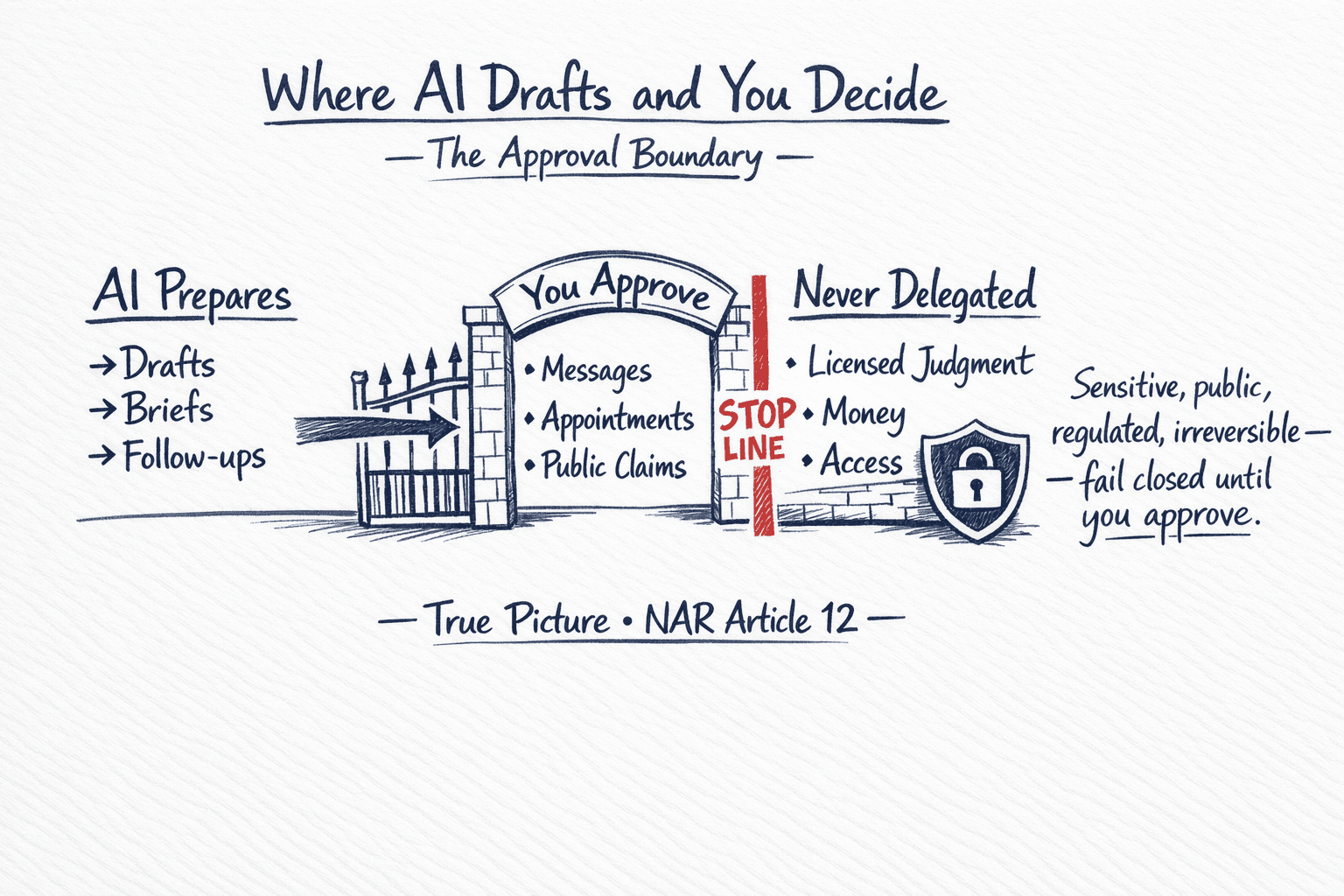
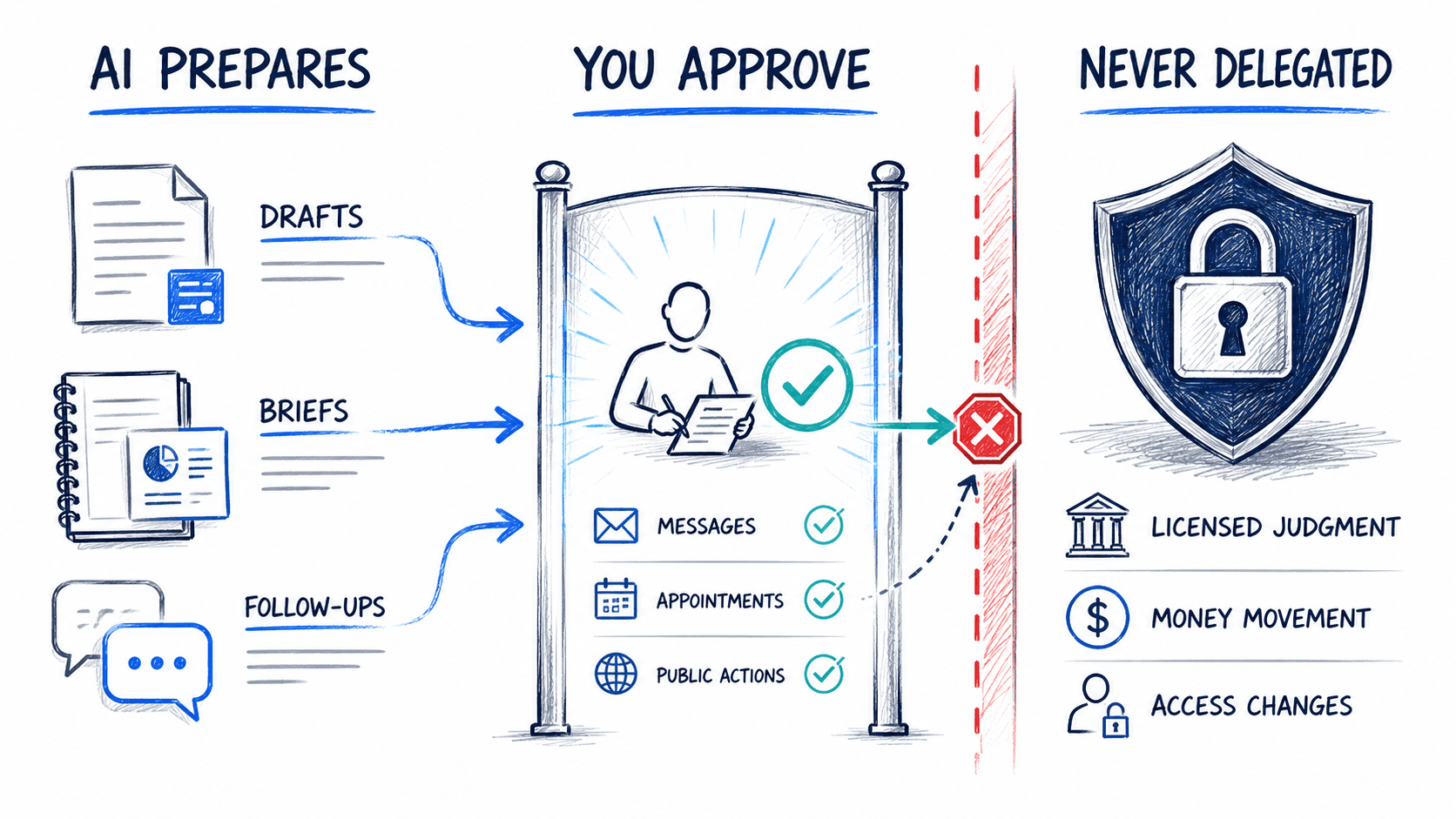
Every workflow starts with explicit boundaries. Sensitive, public, regulated, and irreversible actions fail closed until you approve them.
Why this is different
Not a smarter chatbot. A team that is yours, run with you, with your approval on everything that matters.
Your data is not shared with a public chatbot and not locked inside one assistant app. When a better model comes along, you switch without losing the team, the workflows, or the history it already knows.
We set the team up for you and keep training it with you. Most people cannot train, maintain, or fix their own agent — you should not have to.
A five-person core — briefing, chief of staff, lead response, delivery, and client care — plus specialists as your scope grows. Every commitment gets an owner and a date.
Nothing goes out without your yes. Messages, appointments, and public posts wait at the gate; licensed judgment and money movement are never delegated.
Everything you provide or the team generates is yours. Ask for a copy or ask us to delete it — if you leave, you get workflow documentation and an orderly handoff.
| Topic | Simply Managed AI | Generic personal agents |
|---|---|---|
| Who owns it | Truly yours — your team, your workflows, your history. Switch models without starting over. | Locked inside one assistant app or chat history. |
| Who runs it | Managed with you — we set it up and keep training it together. | DIY — you prompt, troubleshoot, and maintain it yourself. |
| Who does the work | A named five-person team with an owner and a date on every commitment. | One general helper with no roles and no owners. |
| What goes out the door | Nothing sensitive sends without your approval; money movement is never delegated. | One click can send, post, or spend — often with no gate. |
| Your data | Yours — get a copy or ask us to delete it. Orderly handoff if you leave. | Stays in their system on their terms. |
| When you get busy | Follow-through keeps running — speed-to-lead, nurture, checklists, and the weekly brief. | Work waits until you remember to ask again. |
| Your current tools | Stay in place — inbox, CRM, calendar, and website. The team connects the work between them. | You adapt to the app — new login, new workflow, same gaps. |
The operating rhythm
Your AI team keeps the routine moving and brings people the decisions, exceptions, and client-facing work that still need judgment.
Monday
Start with the leads, follow-ups, and three owner decisions that matter this week.
Wednesday
Surface what is stalled or at risk while there is still time to intervene.
Friday
Close the loop on this week and prepare the work that should begin next.
Monthly
Outcomes review
Review what the operating system did, what changed, and where the next month should improve.
Lead-response time
Follow-up completion
Owner time returned
Workflow and access review
Inbox to brief
Inbox, CRM, calendar and tasks flow through Scan, Filter, Connect, Summarize and Prepare and land as an 8 AM brief: decisions with owner, deadline and dollar attached, plus pipeline pulse, exceptions, and a full audit trail.
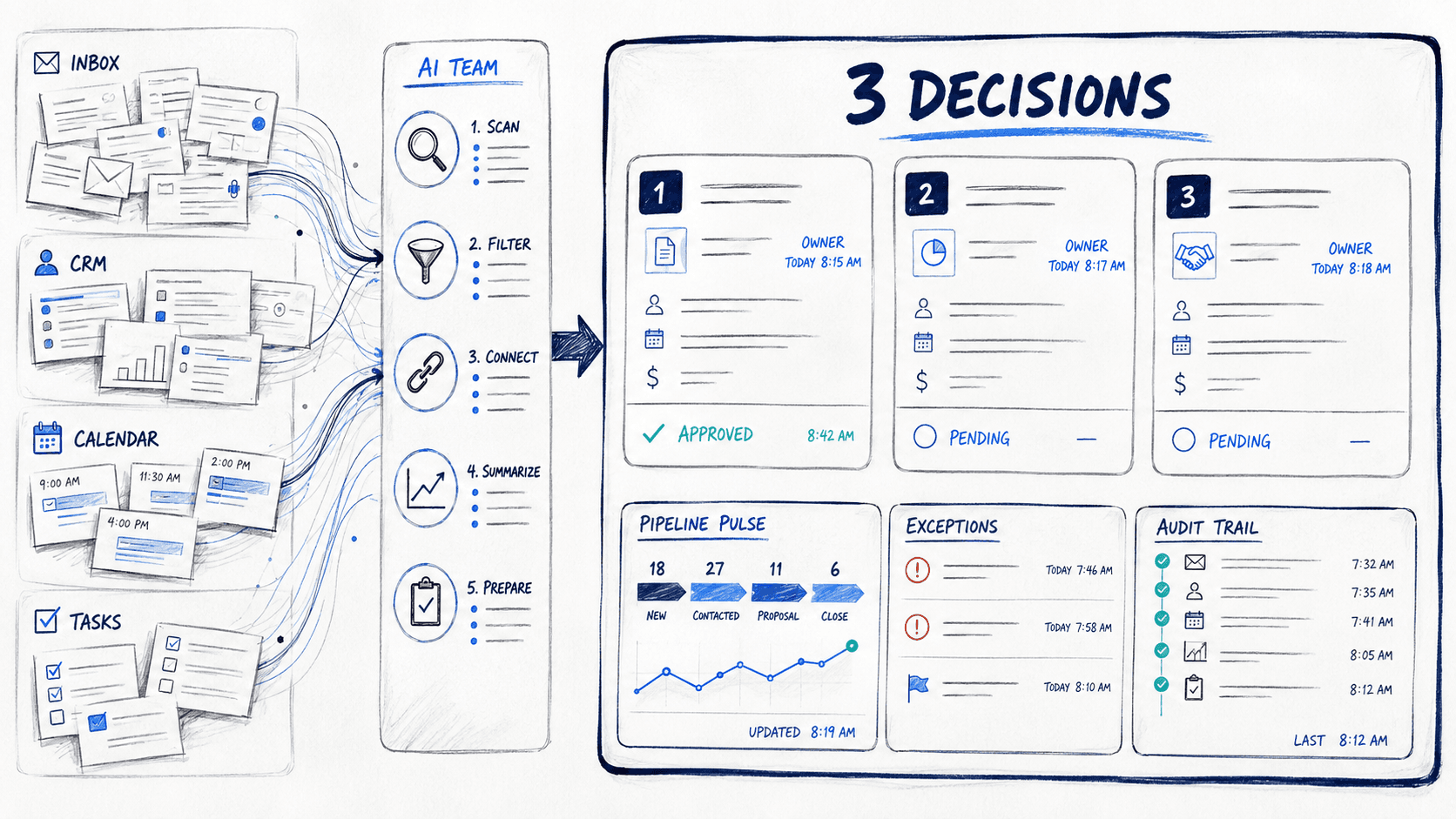
Monday · 8:00 AM
Your decision queue
Elena · Lead responseJordan Ellis · Website inquiry · Waiting 14 minutes
Elena has a factual reply ready with the showing window and one useful qualification question.
Theo · Listing deliveryListing milestone · Decision needed before 2:00 PM
Theo held two vendor windows and mapped the downstream launch dates for each option.
Priya · Client careSix relationships · Personalized drafts prepared
Priya found six timely reasons to reach out and drafted each note in your voice.
Narrated, with a score. Watch the follow-through gap close, from the late-night inquiry to your approval on everything that goes out. Autoplay starts muted. Use the speaker button to listen.
Narrated with captions and score. Use the speaker button to listen.
How the launch works
No giant transformation project. Pre-built workflows run from day one, your first session tailors the rest together, and one workflow is proven before the next.
Your pod goes live fast with pre-built workflows already running around the tools you use.
Together we tailor the rest to your voice, your tools, and your approval boundaries.
One workflow runs with human review until it is proven. Only then is the next one scoped.
Outcomes, exceptions, and next moves — reported on dates we set together, for as long as the service runs.
Features and benefits
One managed install covers the follow-through layer of your business — the parts software features never quite reach.
CEO briefing, Chief of Staff, Lead Response, Delivery Coordinator, and Client Care arrive as a working team, with specialists added from the 14-role roster as scope grows.
Pre-built workflows run from day one. Your first session tailors the rest together, and one workflow is proven before the next — no transformation project.
The team prepares; you approve messages, appointments, and public posts. Licensed judgment, money movement, and access changes are never delegated. Sensitive actions fail closed.
Email, calendar, CRM, and website keep working. The team connects the work between them instead of adding another login.
Weekly pipeline briefs, exception-only escalation, and a rhythm that keeps every commitment moving between the people who own it.
New inquiries are captured, understood, and routed into an owned next step while intent is fresh — overnight queues arrive handled and sorted.
One clear operating brief replaces dashboard digging: what moved, what needs a decision, and what happens next.
Track your work, request a reboot, or schedule cancellation at the end of your billing period in the customer portal. Contact support to coordinate a service pause or resumption under your Order.
Disclosures, intake forms, and records go out on a dedicated fax line and inbound faxes land in the same approval flow. Delivery confirmations are logged, not lost in a tray.
Built for relationship-driven teams
Every relationship business wins or loses in the follow-through. The same five-role operating team adapts to your vertical — with workflows scoped to how your business operates and every client-facing action waiting at your approval.
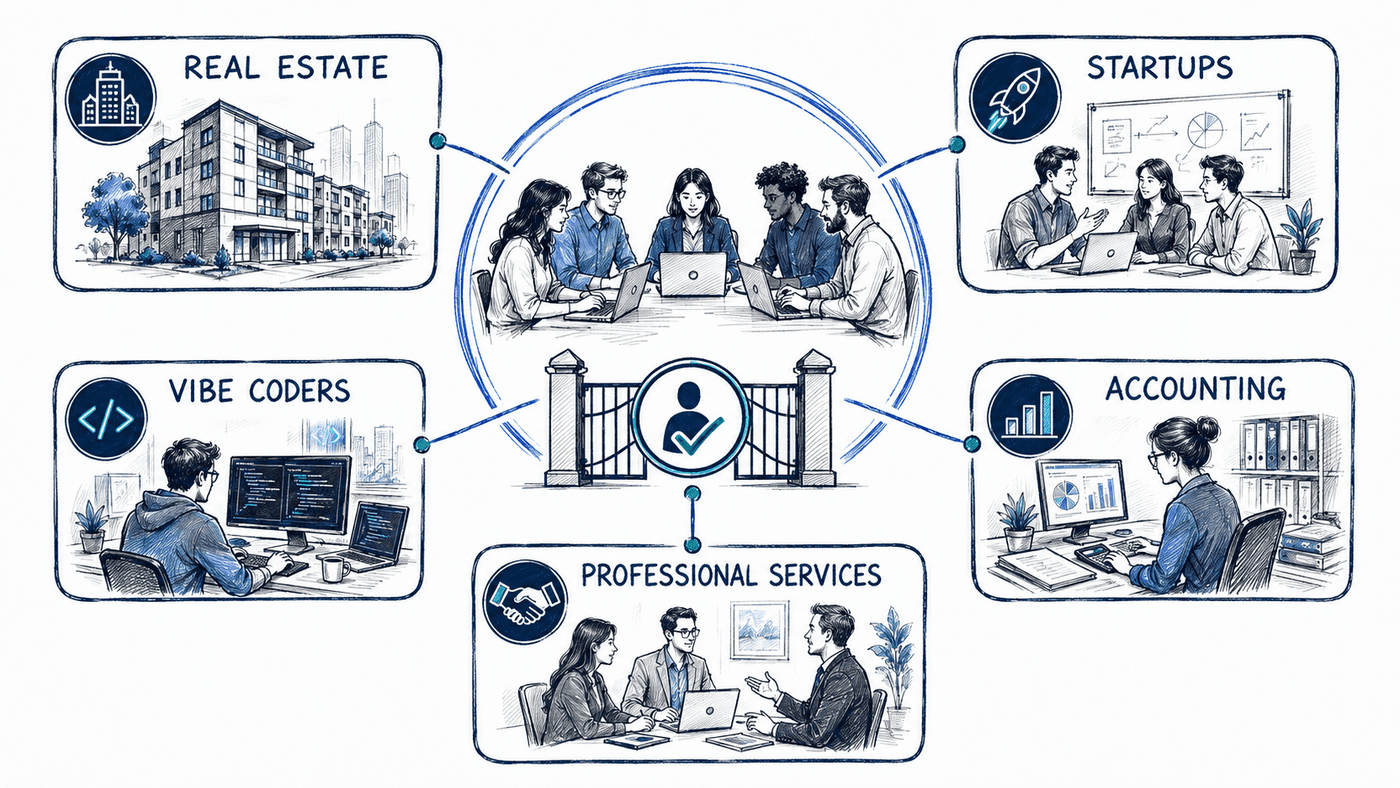
Speed-to-lead, nurture, listing coordination, pipeline reviews, and referral follow-through — with you approving every send.
A working SaaS prototype you can steer, then an AI development and product-operations partner while you keep building.
Intake to deadline without the document chase: checklists, deadline tracking, and client status updates on a steady cadence.
Client intake and routing, deliverable tracking with proactive updates, and renewal follow-through that does not die when you get busy.
The back office you never had to hire: inquiries answered, site and offers kept fresh, and customers followed up with — in your voice, on your approval.
You are the CEO and the intern. Your pod puts a chief of staff and specialists behind you so leads, scheduling, and admin keep moving while you deliver.
In their words
Real reactions from the first people to run their business on a Simply pod — collected September 2026.
It's my dream come true because you just want to make a landing page, but you don't want to have to contact a human... you don't want to have to discuss it... you just want to try stuff, you know, and so it's so freeing.
Every single person could use one of those... Every business owner needs this.
And today, my confidence increased 100%! That's exactly what you want customers to feel, and I experienced it today.
Using the Simply agents simplifies running our non-profit, allowing us to seamlessly update our site, implement fresh features into our CRM, and effortlessly engage with supporters. We manage all our donors and keep track of donations, outreach, and handle all of our shows.
I love using the Simply agents to run our real estate brokerage, connect with prospects, onboard team members, and seamlessly handle our pipelines. It makes life so easy.
I have six or seven projects going at once. One agent is my personal assistant — I tell him what to change on the website or the app and he just does it. It takes something that is really complex development and makes it simple. I get an MVP and can iterate on it myself.
Pick your vertical and see what the pod does for your kind of business →
Plain pricing
Choose the scope and support that fit your business. Your agreed Order defines the work and billing terms. Want to explore the experience first? Take the demo station for a drive →
No setup fee. A pod-guided, self-serve onboarding runs a five-role AI operating core on your own clock — one simple subscription, cancel anytime.
No setup fee
For one productive operator whose attention is the constraint.
$5,000 one-time implementation
For founders who want a working SaaS prototype, then an AI development partner to keep vibe coding every month.
$5,000 prototype setup
For two to ten people sharing one book of business.
$12,500 one-time implementation
For firms that need governance, routing, and oversight.
$25,000 one-time implementation
For organizations that need custom security, governance, routing, and rollout support.
Custom scope and implementation
After payment is confirmed, your team enters provisioning. Check your portal for progress and access when your team is ready.
Start with Self-Serve or Solo, build a SaaS prototype, equip a Team or Brokerage, or scope an Enterprise rollout. Choose based on the work you need done and the approval boundaries around it.
Explore solutions by industry and choose the one that matches how you work.
AI-usage allowances, overage rates and billing method are unset here. Your agreed Order governs any AI-usage charges. This page does not establish an included allowance or change existing Order terms.
Self-serve delivery
Select the offer that fits the work. Your Order defines the setup, support and billing terms.
Complete the Stripe checkout. Team setup begins after payment is confirmed.
Your team enters provisioning. Follow its status in the customer portal while setup and checks run.
Use the access link when your portal shows the team is ready. Contact support if setup needs attention.
Agree the source, scope and output with your team. Review the result before approving any external action.
Built by operators
Simply Managed AI is being built by Vanessa Rudin, who leads operations, and Empowered.Guru LLC, which builds and licenses the agent platform beneath it.
The company is its own first customer. Every workflow enters the client library only after it has done real operating work here first.
A straight answer
The leak is response, nurture, and follow-through.
Email, website, calendar, and CRM stay in place.
You need operating leverage, not another login.
We operate what happens after a lead arrives.
Self-Serve is hosted with AI-guided setup; guided offers add human implementation.
Sensitive actions remain under human control.
Insights
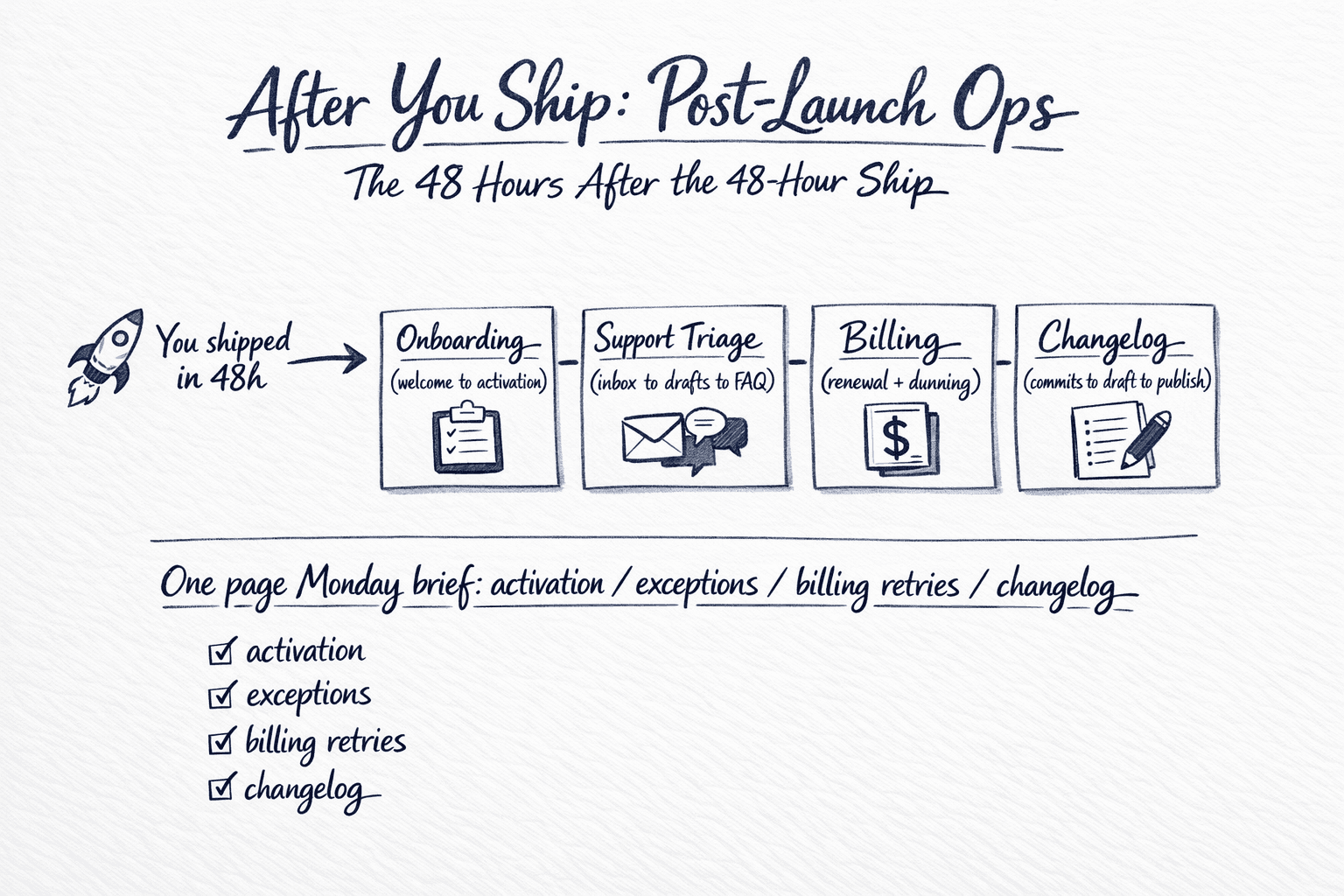
Practical notes from running the same operating system we install — lead response, listing coordination, nurture, pipeline, and the post-ship cadence for builders.
Fair questions
They are configured AI roles with clear responsibilities, reporting lines, and approval boundaries. The portraits on this site are illustrative personas, not human employees.
No. They prepare, coordinate, summarize, and surface next actions. Licensed judgment, public claims, client commitments, money movement, and sensitive sends remain with you.
Access to the approved tools you already use, a kickoff and boundary-setting session, and roughly an hour a week during launch. We handle configuration, monitoring, and the operating cadence.
Access is scoped to the systems and workflows you approve. Provider terms, data boundaries, retention, and bring-your-own-key options are documented before launch.
Yes. The team can send and receive faxes on a dedicated fax line — disclosures, intake forms, records, and anything else that still moves by fax. Every transmission gets a delivery confirmation, and inbound faxes are read, classified, and routed like any other document. No fax machine, no paper tray.
You keep your data and accounts. We provide workflow documentation and an orderly handoff so the operating knowledge is not stranded.
Start with the messiest workflow
Show us where work goes cold or falls between people. We will tell you whether an AI operating team fits, what it should own first, and where a human must stay in the loop.